

Hey fellow Spark adventurers! You know how we all try to make our Spark queries lightning fast, especially with those massive datasets?
The usual game plan is pretty straightforward: organize your data smartly and pick the right join moves to keep data shuffling to a minimum.
But what if I told you that sometimes, even following the rulebook can throw you a curveball?
I recently dove headfirst into exploring Spark's I/O bottlenecks and figuring out the real best practices. And let me tell you, this journey through various benchmark scenarios gave me some seriously cool insights!
When Local Filesystems Slow You Down
Our partitioning benchmark aimed to compare read performance between a partitioned and a non-partitioned Parquet table in a local Spark environment. Both tables contained sales data, and I applied a filter on the ss_sold_date_sk column (L58), which was also the partitioning key for the partitioned table. I expected the partitioned table to significantly outperform the non-partitioned one due to efficient partition pruning.
Here's what I observed for partitioning:
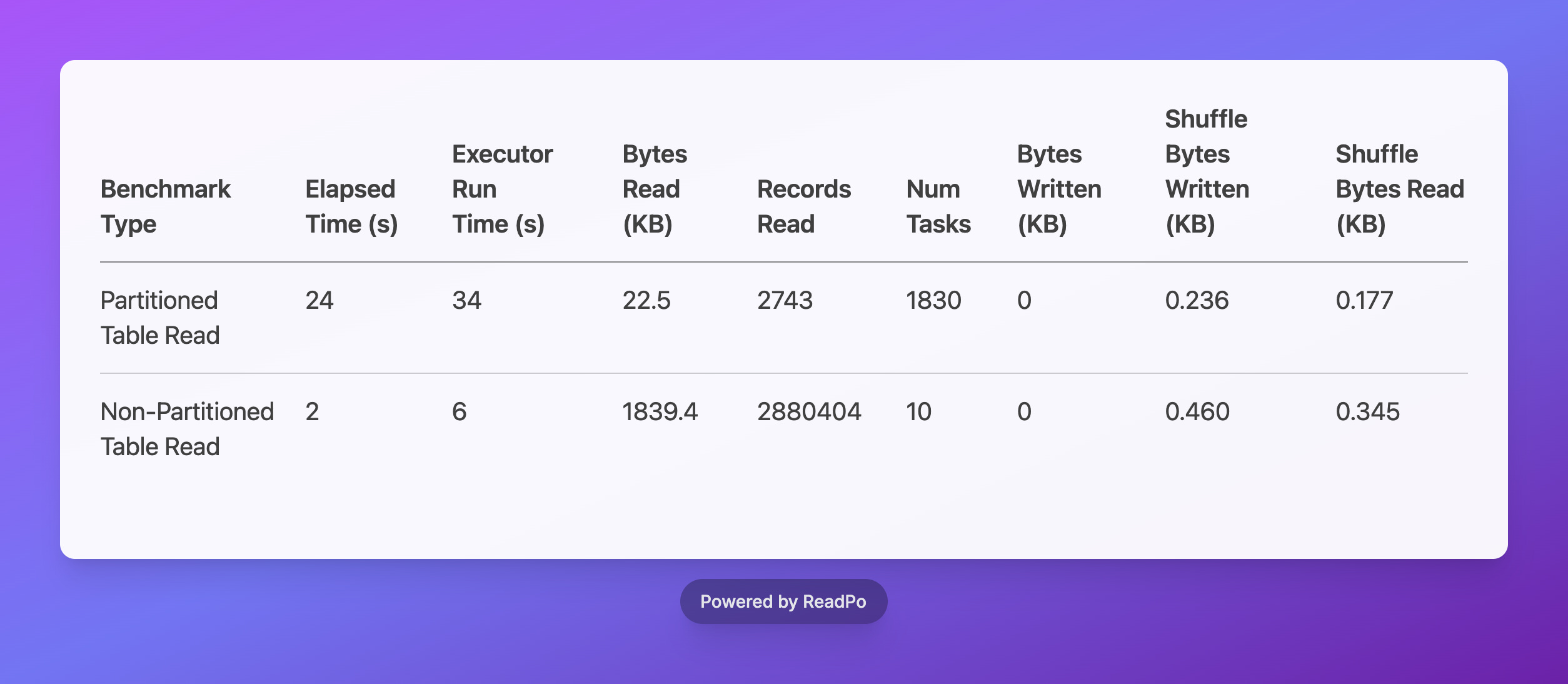
And boy, were the results surprising! While the partitioned table dramatically cut down on Bytes Read (22.5 KB vs. 1839.4 KB) – a clear win for data pruning – its Elapsed Time was a whopping 12 times slower, and it spun up an astonishing 183 times more Num Tasks than the non-partitioned table. Talk about counter-intuitive!
Spark's logs spilled the beans:
InMemoryFileIndex: Selected 1 partitions out of 1824, pruned 99.9451754385965% partitions.
This confirmed that Spark was logically identifying the correct partition. But here's the kicker: the high Num Tasks and Elapsed Time pointed to a significant bottleneck in the physical discovery phase. Even though Spark knew it only needed one partition, it still had to trudge through and list all 1824 partition directories on the local filesystem just to find that single relevant one.
This directory traversal is a real drag on local filesystems, especially when you have a gazillion tiny directories. It really highlights a key difference between local filesystems and awesome distributed object storage like S3, where optimized connectors can magically query for specific partition paths without breaking a sweat.
Choosing the Right Strategy
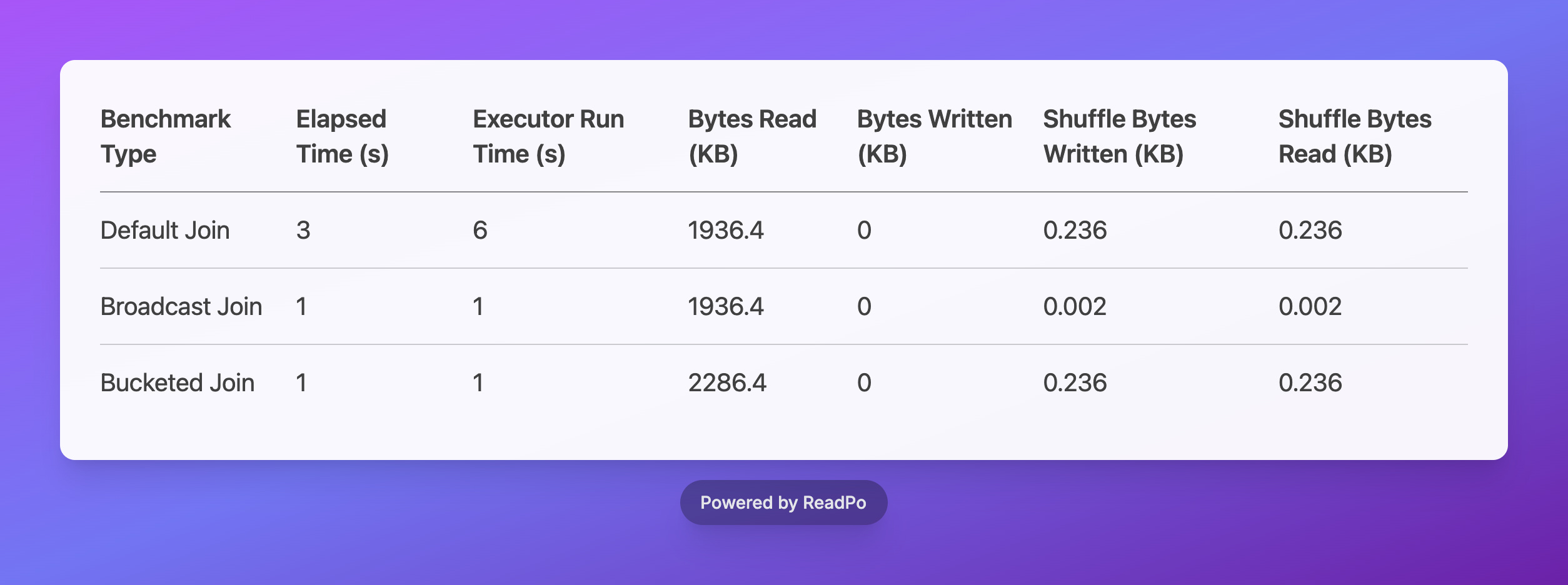
Beyond partitioning, picking the right join strategy is super important for Spark performance. I benchmarked three common join types: Default Join, Broadcast Join, and Bucketed Join.
Here are the results for join operations:
Here are the awesome insights I gathered from the join operations:
Default Join Baseline: Think of the standard (default) join as your baseline. It usually involves a good chunk of data shuffling across the network, and my benchmarks showed it with higher elapsed time and shuffle metrics.
Broadcast Join Efficiency: The Broadcast Join was a total rockstar! It significantly slashed the elapsed time to just 1 second and executor run time to 1 second. This is your go-to move for joining a big table with a smaller one because it practically eliminates shuffle operations (we're talking a tiny 0.002 KB shuffle bytes!). A massive improvement over the default join, for sure.
Bucketed Join Performance: The Bucketed Join also hit that sweet spot with the lowest elapsed time (1 second) and super efficient executor run time (1 second). This one's a champ when your data is already pre-organized using bucketing. It minimizes data shuffling like a pro and is incredibly effective for those large-scale joins on pre-bucketed data.
My Top Spark Tips for You!
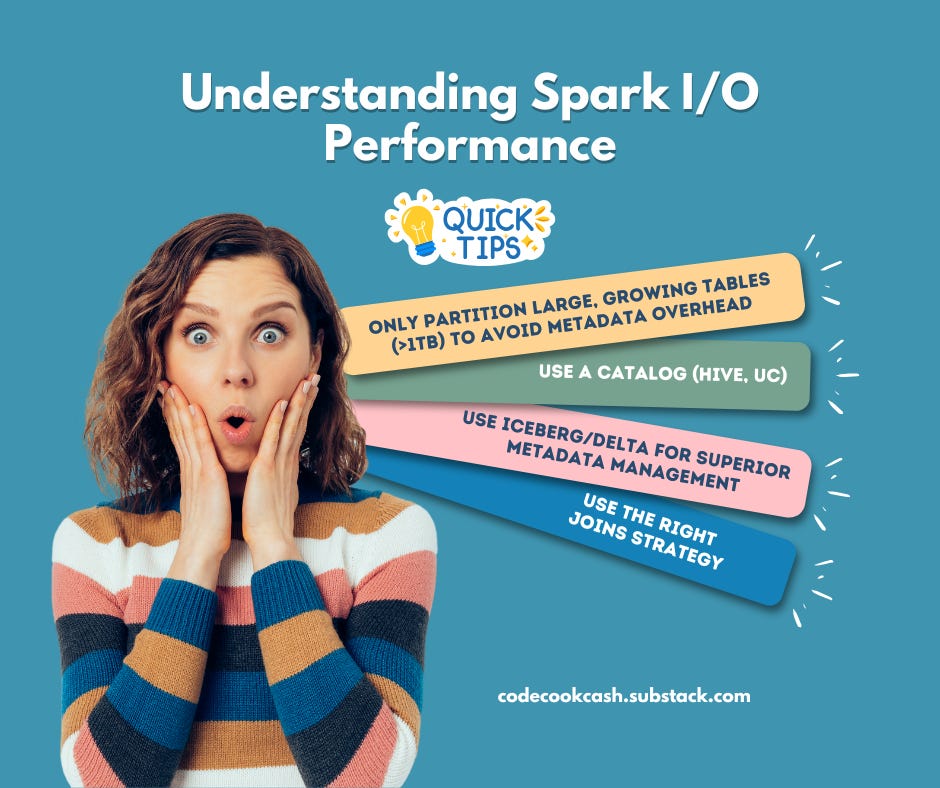
Strategic Partitioning: Only partition large, growing tables (>1TB) to avoid metadata overhead. For smaller tables, keep them flat. Always consider granularity to balance data organization and metadata discovery costs.
Leverage Catalogs & Modern Formats: Use a catalog (like Hive, Unity Catalog, or others) for efficient partition pruning. Enhance this with modern table formats (Iceberg, Delta) for superior metadata management and file filtering.
Master Join Strategies: Optimize joins by choosing the right strategy: Broadcast Join for small-to-large table joins, and Bucketed Join for pre-organized data to minimize shuffling. Avoid default joins when better alternatives exist.
---
For getting started with these benchmarks and running your own experiments, check out the GitHub repository: https://github.com/hoaihuongbk/spark-io-experience
Awesome, I’m having the same performance drag and mounting request costs when scanning numerous small files on S3 that adhere to datetime partitioning. It takes a large number of files just to fill a single partition for each core to process.
I guess unless the total data volume is substantial enough for each partition or, ideally, file to approach the optimal 128 MB size and downstream consumers can leverage column-level filtering, partitioning too early without actual use cases may actually hurt read performance and increase reading cost.